

One of the primary reasons WordPress dominates the CMS (content management system) market is its ecosystem of plugins. With over 60,000 plugins currently in the WordPress.org repository, the possibilities are nearly endless. Whether you need a simple SMTP tool for emails, a professional contact form, a robust user forum, or a full-scale Learning Management System (LMS), there is likely a plugin for that.
In fact, the challenge usually isn’t finding a plugin—it’s choosing the right one from a sea of options.
How do you decide which plugin is the best fit for your site? Here are the basic considerations I use.
Basic Considerations
Is it up to date?
First, ensure the developer actively maintains the plugin. If it hasn’t been updated in several months, it’s a red flag.
You should also check that the “Tested up to” version matches the latest release of WordPress. While it’s understandable if an individual developer takes a few days to update after a new WordPress release, being several versions behind is a sign of neglect.
This is critical because WordPress updates frequently. While rare, changes to the WordPress core can break plugin functionality. To avoid site crashes or security vulnerabilities, you want a plugin that is actively tested against current versions.
If you see a warning message like this, it’s generally best to keep looking:
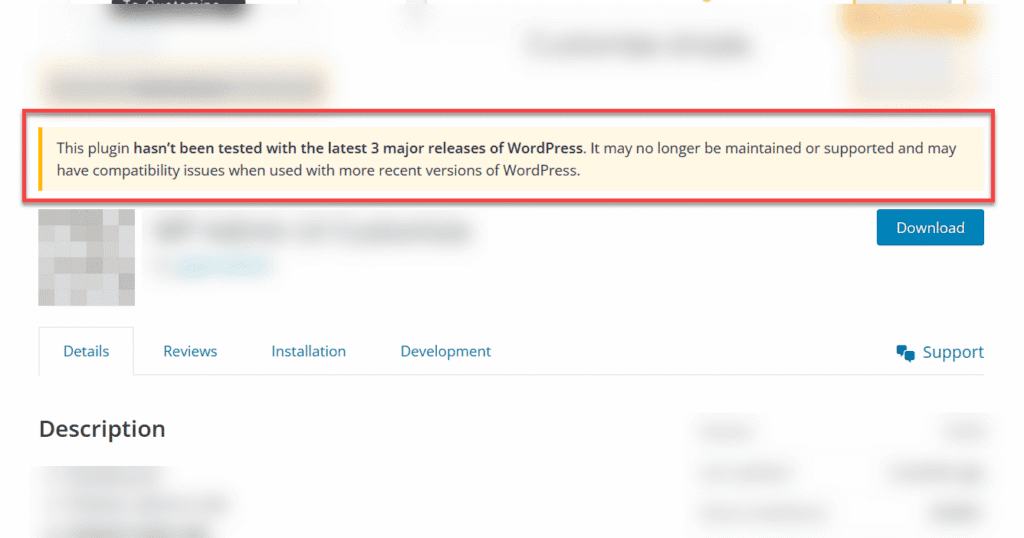
Keep in mind: if you insist on using an outdated plugin, you may have to maintain the code yourself.
Popularity vs. Niche Utility
As someone who has published plugins on WordPress.org, I can tell you that popularity is often a proxy for longevity. Many developers launch plugins hoping for success; when they don’t find it, they abandon them.
Generally, the more active installations a plugin has, the more likely the maintainers are to stick with it—especially if the plugin has become a source of revenue. High installation numbers also mean that any widespread bugs will be quickly identified and reported in the “Reviews” tab.
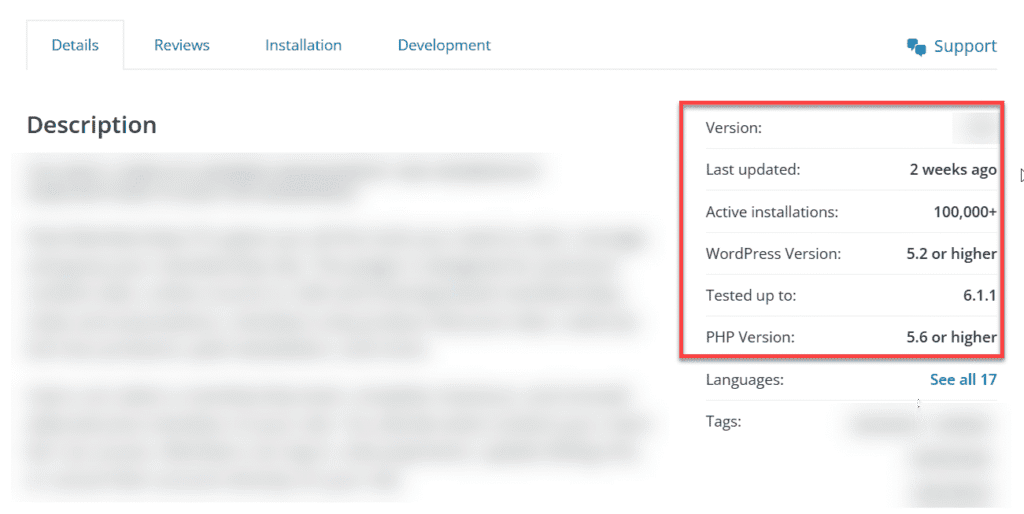
However, popularity must be contextualized. For example, I once searched for a “safety exit” plugin for a client. The one I chose had fewer than a thousand installations, but because it serves a very specific niche, those numbers are perfectly acceptable. Match your expectations to the utility of the tool.
Ratings and Responsiveness
Don’t just glance at the star rating—read the reviews. If a plugin is rated below four stars, try to identify the pattern. For smaller plugins with fewer reviews, one or two harsh critiques can tank the average; check if those complaints are legitimate or just user error.
More importantly, look at how the developers respond. Every plugin on WordPress.org has a support forum. Are the maintainers responding promptly? Are they providing actual resolutions or just canned responses? A responsive developer is often more valuable than a “perfect” piece of software.
The Bottom Line
The “pluggable” nature of WordPress means it can handle almost any requirement you have for a website. But as the saying goes, “with great power comes great responsibility.”
Because WordPress is open-source and free, the responsibility of curation falls on you. I hope these guidelines help you curate a lean, stable, and efficient set of plugins for your site.
If you have any questions about a specific plugin or the process, feel free to leave a comment below!
